
Possible causes and solution(s)
Symptoms
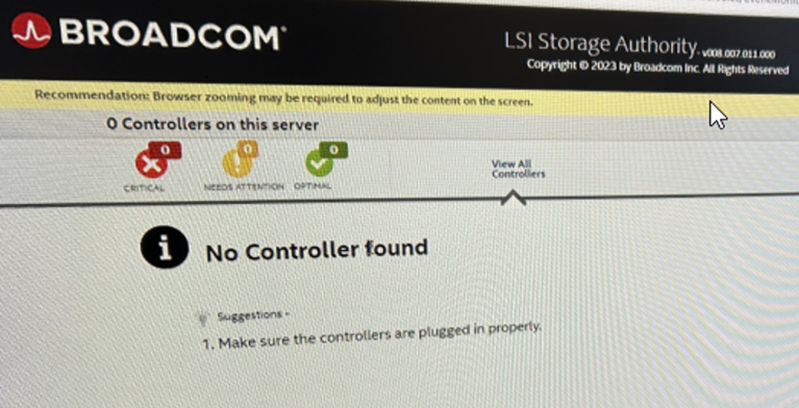
After logging in to the LSI Storage Authority, the message “No controller found” is displayed and the RAID controller is not detected in the system.
Causes
-
The RAID controller is not properly plugged in or is defective.
-
The SAS cables are disconnected
-
The RAID controller firmware is not functioning correctly.
Solution
If the unit is new, this issue may indicate a hardware fault that requires replacement (RMA).
Please contact the Technical Support team and provide the following information to assist with diagnosis:
-
Set of logs: How to collect logs from DIVAR IP all-in-one 7000 gen4 through ASUS Inband Tool?
-
Screenshots showing the Dashboard and RAID Health section
-
Note: If the RAID controller information is displayed correctly in the Inband tool, it is possible that the BMC Web UI is behaving abnormally.
In this case, please try performing a "Restore Factory Defaults" via the Maintenance function in the BMC Web UI, and then check again.
-
-
Was the RAID controller ever functioning properly?
-
Can the storage devices be detected?
-
Are all storage LEDs functioning normally (especially the RAID controller LED)?
-
Also, to speed up the process, it would be helpful to provide Technical Support with details related to the site:
-
Company Type (End-user, Retailer, Company):
-
Contact Name:
-
Country:
-
Province:
-
City:
-
Street:
-
House Number:
-
Postal Code:
-
Phone Number:
-
Alternative Phone Number (optional):
-
Email:
-
Note:
DO NOT attempt to remove or replace the RAID controller or any internal components unless instructed by the Technical Support team. The warranty coverage may be affected if internal components are accessed without authorization.