
Question
What to do if the ASUS Inband Tool does not start when trying to access it?
Answer
If the ASUS Inband Tool cannot be accessed, there are several actions that can be taken in order to fix this:
-
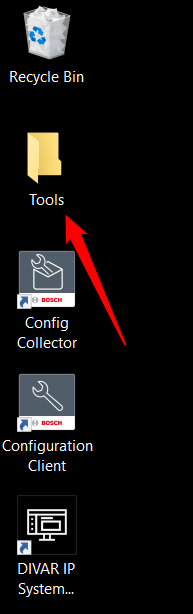
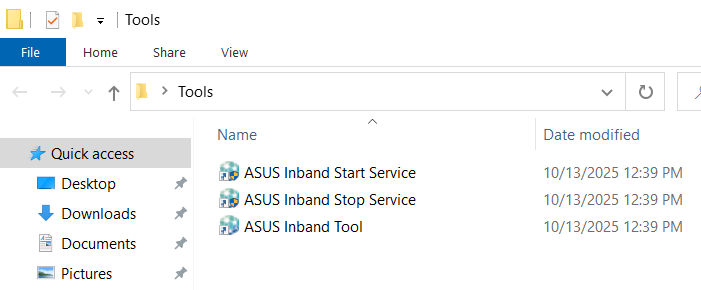
Restart the ASUS Inband service and try again. The service can be stopped and started from the Desktop -> Tools folder or by using the Windows Search function:
-
ASUS Inband Stop Service
-
ASUS Inband Start Service
-
If the issue persists, uninstall the service via:
Windows Search function → ASUS Inband Uninstall.
-
After uninstalling, reinstall the ASUS Inband Tool and check again.
The latest version can be downloaded from the link below:
https://downloadstore.keenfinity-group.com/FILES/Inband_Tool_1.28.09_SystemManager_package_1.0.zip
Installation prerequisites:
-
The Inband_Tool_1.28.09_SystemManager_package_1.0.zip is applicable only for DIVAR IP all-in-one 7000 4th Gen (DIP-74xx) systems. Installation of the package on other DIVAR IP all-in-one systems will fail.
-
DIVAR IP System Manager application version 2.5.0 or higher shall be installed and started.
-
Download the Inband_Tool_1.28.09_SystemManager_package_1.0.zip file
-
Unzip the files on the storage medium such as a USB stick. Do not change the folder structure of the unzipped files.
-
Connect the storage medium to your DIVAR IP system and follow instructions in the Upgrading software section of the DIVAR IP all-in-one 7000 4th Gen (DIP-74xx) User Manual to upgrade the application on your DIVAR IP.
Please check release notes for more details.
