
Question
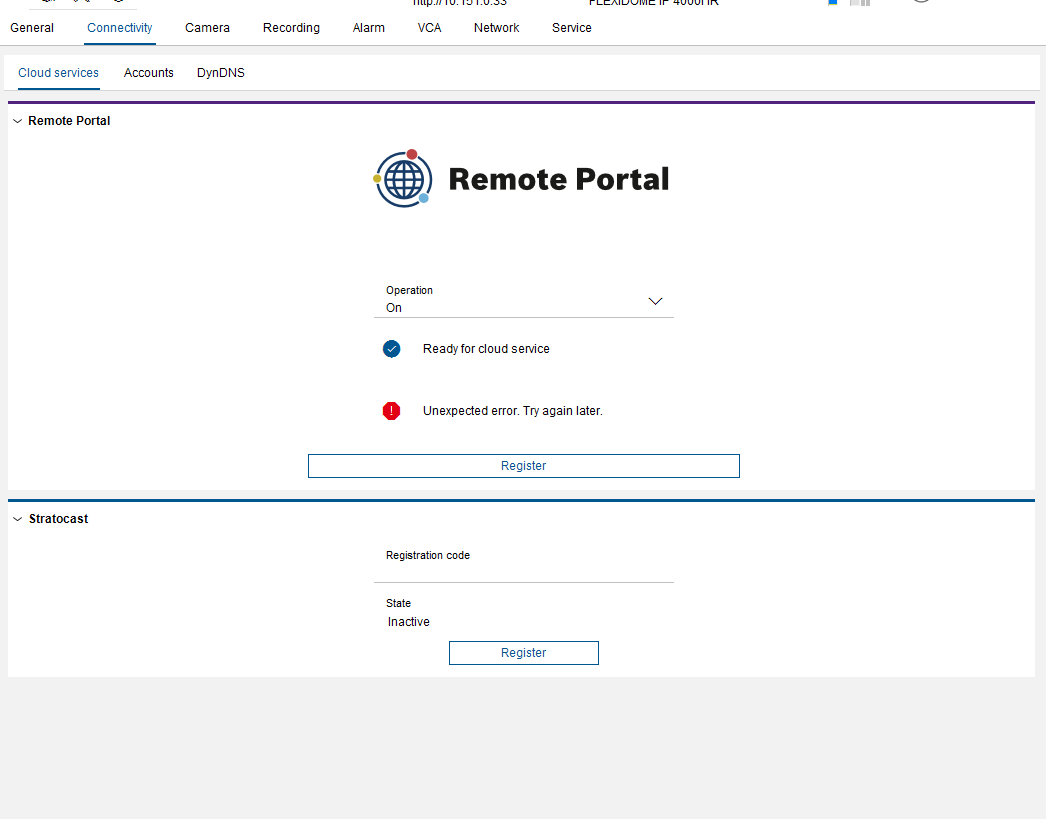
What to do when the ‘Unexpected Error. Try again later’ appears during camera registration in Remote Portal (Configuration Manager)?
Answer
-
If you recently changed the camera name, this message may appear. In this case, remove the affected camera from your Remote Portal account and add it again. For detailed steps, please follow the instructions provided in this article.
-
Another quick workaround is to refresh the Configuration Manager window and check whether the message disappears.
-
If the issue persists, update the camera firmware to the latest version available in the Download Area and perform a factory reset. Also ensure you are using the latest version of Configuration Manager, which is likewise available in the Download Area.
Recommendation:
Check for potential causes such as blocked ports, multiple company assignments, previous cloud registration, outdated firmware, incorrect date/time settings, insufficient user permissions, or wrong credentials.
For step-by-step troubleshooting guidance, refer to the Troubleshooting Camera Connectivity & Remote Portal article.