
Question
Why can’t I add the NetApp DSA-E2800 to BVMS after a Firmware upgrade?
Answer
If you recently updated the firmware on your NetApp DSA-E2800 and are no longer able to add the device in BVMS, even though all network and configuration settings appear correct, the most common cause is that the Legacy Management Interface was automatically set to Off during the firmware upgrade.
BVMS requires this interface to be enabled in order to scan and configure the DSA using the NetApp SANtricity API. When the Legacy Management Interface is disabled, BVMS will not be able to connect to the storage system, resulting in repeated connection errors, even though IP communication, passwords, iSCSI ports, and controller firmware appear to be functioning normally.
Logging confirms that the the Legacy Managment interface is set to off:
ACCESS MANAGEMENT
Directory Services: Not Configured
SAML Authentication: Not Configured
Current authentication type: Local user roles
Legacy management interface: Off
The solution for this behavior is to enable the Legacy Management Interface on the DSA.
Once this option is turned On, the device can be detected and added to BVMS again without issues.
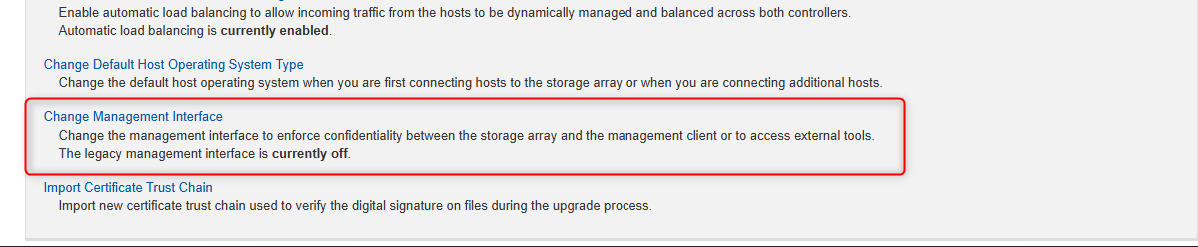
Users who encountered this problem confirmed that enabling this setting immediately resolved the connection problem, allowing BVMS to add the DSA successfully.