
Possible causes and solution(s)
Symptoms
When launching the Operator Client in BVMS 12.2 and 13.0 on Windows 11 Enterprise, it doesn’t start, it remains stuck on loading screen.
Additional symptoms observed:
-
Occasional crash with “unknown” error
-
First login on a workstation may take 20–30 minutes
-
Issue reproduced on Windows 11 Enterprise versions 25H2 and 23H2
-
No improvement after upgrading graphics drivers
-
High CPU and memory usage caused by Microsoft Malware Scanning Service
Causes
The issue is caused by Microsoft Defender Antivirus real-time protection activity.
During the first user login into the BVMS Operator, Microsoft Defender performs an intensive scan.
During this time, the only application that is using CPU/Memory is Microsoft Malware scanning service.
Once the initial scan is completed, the Operator Client functions normally.
Solution
To avoid the initial login delay, the following workaround may be applied:
-
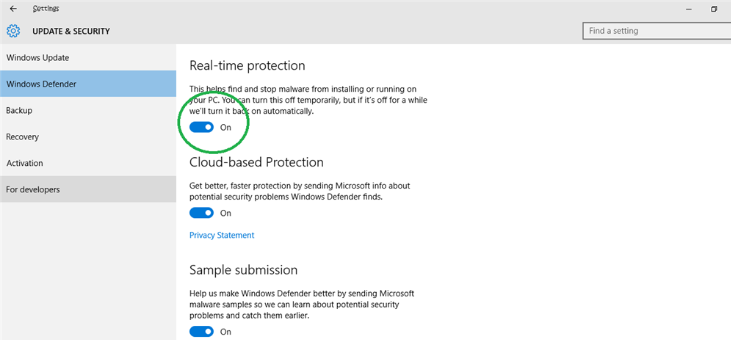
Temporarily disable the Windows Defender Real time protection
-
Launch and log into the BVMS Operator Client
-
Enable again the Real time protection
After re-enabling Real-Time Protection, the Operator Client continues to function normally.
Note: Any modification to antivirus settings should be performed in accordance with the organization’s security policies.
