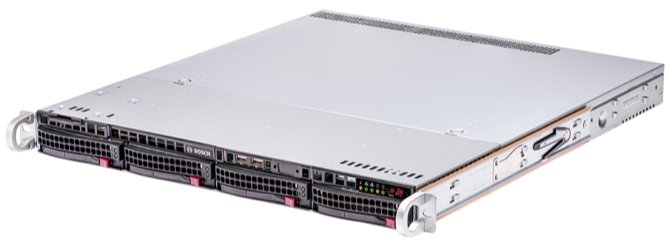
DIVAR IP all-in-one 6000 Picture Short Description RAID-5 protected (standard configuration), all-in-one, fully featured BVMS‑based video recording and management solution for up to 64 channels Out-of-the-box IP video recording with up to 72 TB (4 x 18 TB) storage capacity pre-installed Robust, secure operation — instant real time access to video BVMS‑based advanced user and alarm management DIVAR IP System Manager for operation mode selection, software setup and upgrades DIVAR IP all-in-one 6000 Articles Title Upgrade from BVMS v11.1.1 to v13.1 on DIVAR IP all-in-one 4000 (DIP-44xx) & 6000 (DIP-64xx) What could cause a DIVAR IP 6000 all-in-one to continuously boot into the System Management Utility? How to configure DIVAR IP AIO to be accessed through the Video Security Client or App via Remote Portal? DIVAR-IP all-in-one System Manager and Remote System Management installation and configuration How to install BVMS 12.0.1 on a DIVAR IP 4000 or 6000 AIO if the initial image is 11.1.1? System Manager 2.0 & DIVAR IP 6000 AIO: software file is not visible during the BVMS upgrade process Is it possible to enable Remote Desktop on DIVAR IP all-in-one 6000 and connect on it remotely? Is it possible to mount DIVAR IP all-in-one 6000 in a vertical installation position? How to do factory reset (recovery) of the DIVAR IP units? How to reset a lost IPMI password of DIP 6000 AIO? How to find the DIP serial number and the IPMI (BMC) information of DIVAR IP all-in-one? DIVAR IP AIO 4000 & 6000: Recovery to factory defaults & BVMS operation mode via System Manager How to collect Health event logs & IPMI Maintenance logs of DIVAR IP AIO 6000? How to check the status of the RAID array via LSA, replace & rebuild the faulty HDD (DIP 6000 AIO)? Which are the capabilities and limitations of DIVAR IP AIO & Remote System Management – Blueprints? Which is the max. iSCSI recording sessions of DIVAR IP AIOs? LSA Storage Authority Error Code 49 Invalid Credentials (DIVAR IP 6000 AIO) What are the default username and password for SuperDoctor 5 on DIVAR IP systems? How to access the Windows Interface (BVRAdmin account) after first configuration of DIVAR IP? How to collect System Manager logs from your DIVAR IP AIO 4000 & 6000 & 7000 gen4? Bosch Security Advisories - PSIRT (Product Security Incident Response Team) What are the possible causes of Video Connector showing N/A in Remote Portal or fails to connect? How to add a subscriber for Remote Alert of DIP 4000, 6000 or 7000 AIO connected to Remote Portal? Fix the Time Zone on the DIVAR IP all-in-one 4000, 6000 & 7000 after installing BVMS v12.1 or v12.3 and enabling UAC DIP 44xx & 64xx potential issues on first installation How to customize the Kiosk with logo on DIVAR IP? How to collect RAID Controller Event log, Diagnostics Logs or Server Report of DIP 6000 AIO via LSA? How can I change the BVRAdmin password of my DIVAR IP 6000 AIO? How can I return on the kiosk mode from System Manager (DIVAR IP 6000 AIO)? Why can't I access any program from kiosk mode on DIP AIO? Which are the default administrator credentials for Bosch DIVAR IP Systems? BVMS Upgrade fails on DIVAR IP with previously BVMS patches installed (An unexpected error occurred)